
Ekiro · iPhone + Apple Watch
Run to your own plan. Ekiro adapts.
Build a workout from running, walking, and your own custom stages — from your first run to an advanced plan. Ekiro tells you when to switch, and with Apple Watch it alerts you if your heart rate moves outside the limits you set.
Free download · Requires an iPhone with iOS 17 · Apple Watch optional
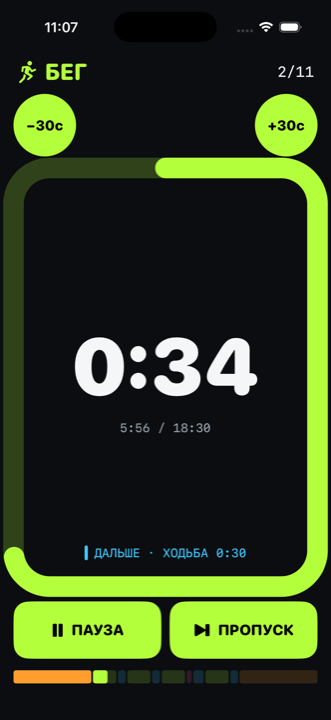
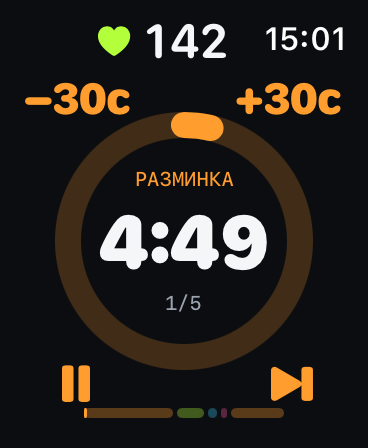
A workout that fits you. Not the other way around.
Ready to run 30 seconds today? Run 30. Comfortable with 5-minute runs a month from now? Change the intervals. Want to add sprints, recovery, or a custom stage? Add them.
In Ekiro, you can pick a ready-made workout or build your own — one that fits you today. Then keep changing it as you progress.
Ekiro gives you the tools. How you use them is up to you.
Builder
Any intervals. In any order.
30 seconds of running, two minutes of walking? Easy. A few sprints, recovery, and a hill at the end? That works too.
Add the stages you need, change their length, and repeat them as many times as you want. A workout can be as simple — or as advanced — as you like.
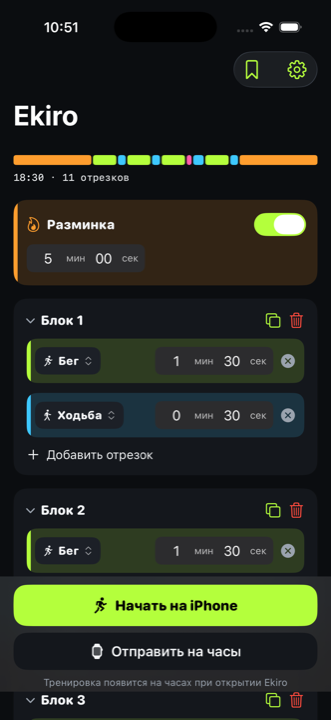
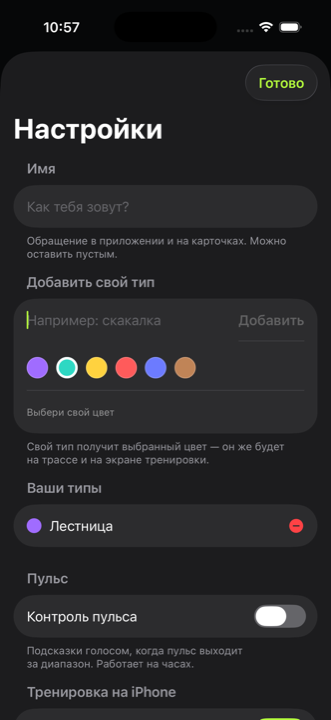
For beginners
Your first workout is already built.
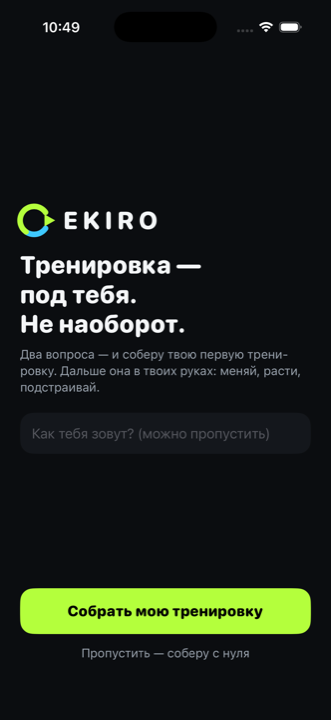
Answer two questions, and Ekiro builds your first workout for you. No need to put a plan together from scratch.
Nine more ready-made workouts are waiting in Saved: pick one, try it, then adjust it to fit you.
A ready-made workout isn't a rule here. It's just a convenient starting point.
Voice and alerts
Just run. Ekiro tells you when to switch.
No need to count seconds or keep checking the screen. 10 seconds before each stage change, Ekiro plays a warning signal.
At the switch itself, another signal sounds and a voice announces the new stage: “Run”, “Walk”, or one of your own — “Sprint”, “Hill”, “Recovery”.
You keep moving — Ekiro keeps the time.
On Apple Watch the signals are audible; on iPhone you get vibration instead: one before the change, two or three at the switch.
Heart rate
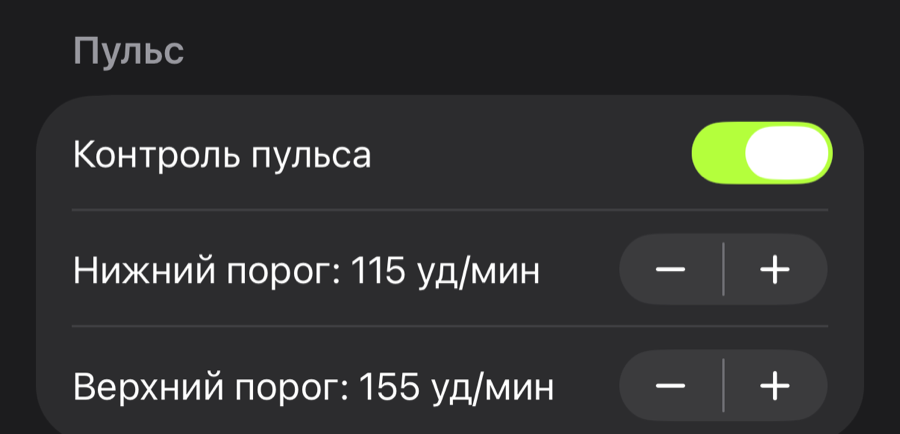
You set the heart-rate limits.
Pick the range you want to train in. If you start the workout on your Apple Watch, the watch reads your heart rate, and Ekiro alerts you if it moves outside the limits you chose.
Only Apple Watch can read your heart rate. Ekiro works without the watch too — just without the heart-rate monitoring.*
Ekiro Coach
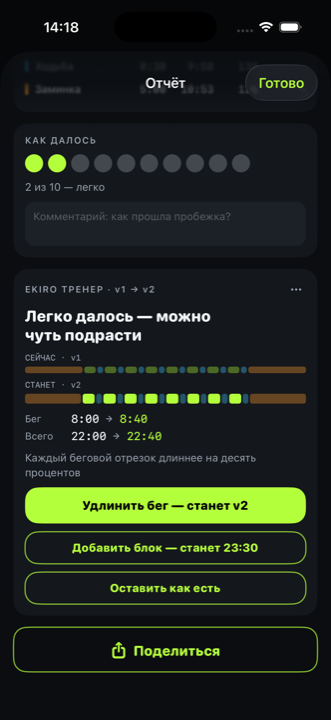
Felt easy? Add a little more.
Rate how hard the run felt — Ekiro Coach suggests the next step and updates the workout in one tap.
That way, your workout evolves with you.
iPhone + Apple Watch
Run light with Apple Watch. See the results on iPhone.
If you have an Apple Watch, you can start the workout right from your wrist. The watch shows the current stage, counts down the intervals, reads your heart rate, and lets you know if it moves outside the limits you set.
After the run, the results automatically appear on your iPhone — where it’s easier to review the full report at your own pace.
Apple Watch — during the workout
- guides you through the intervals;
- shows the current stage;
- reads your heart rate;
- alerts you if it moves outside the limits.
iPhone — after the workout
- receives the results;
- shows a detailed report;
- keeps all your runs and your progress.
Apple Watch is optional: Ekiro also works on iPhone alone.
Report
The run is over. Now you can see how it went.
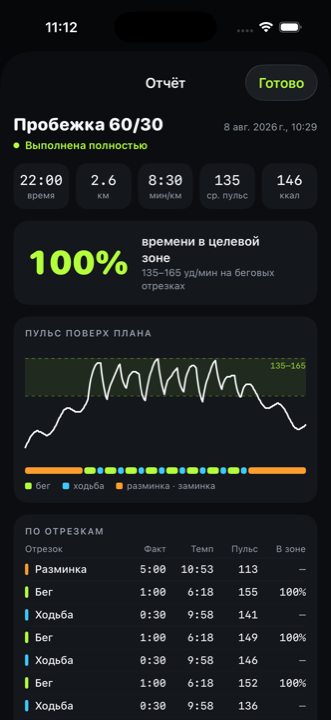
After the workout, the results appear on your iPhone. If you ran with an Apple Watch, the watch data — including heart rate — is sent there too.
Catch your breath, put the watch away, and review your time, distance, pace, heart rate, and each segment when you’re ready.
If your phone was with you, distance is measured by GPS. Without the phone, Ekiro estimates it from your average speed and marks that number with “≈”.
One line
The whole workout in front of you.
You don’t have to look at the screen. But if you do, one glance is enough to see what you’re doing now, how much time is left, and what comes next.
Features at a glance
Your own intervals
Any length, order, and number of repeats.
Your own stages
Create your own stage type — with its own name and color.
A heads-up signal
A warning 10 seconds before each stage change.
Signal and voice
At the switch, Ekiro plays a signal and announces the new stage.
Apple Watch
Run without a phone in your hand — the watch handles it all.
Heart-rate control
Apple Watch tracks your heart rate, and Ekiro alerts you if it goes outside the limits you set.
Ready-made workouts
Nine options to start with — plus a first one built for you.
Ekiro Coach
Rate how hard the run felt — Coach suggests the next step and updates the workout in one tap.
Report on iPhone
Review your run afterward: time, distance, pace, heart rate, and each segment.
Choose how you want to train
Free
After the trial, you keep:
- 3 ready-made interval workouts for different fitness levels — “Rhythm 30/30,” “Rhythm 60/30,” and “Classic 3:1”;
- workouts with Apple Watch;
- voice guidance and signals;
- detailed post-run reports;
- week-by-week progress.
Free forever
Ekiro Forever
Build workouts your way — from simple run-walk intervals to more complex plans with repeats and custom segments.
- Use ready-made workouts as a starting point and adjust them to fit you;
- save the setups that work for you and come back to them anytime;
- set your heart-rate limits on Apple Watch.
$5.99 one-time purchase
No subscription.
🎁 60 days of Ekiro Coach included
Ekiro Coach
Everything in Ekiro Forever — plus guidance on how to move your training forward.
After every run, rate how hard it felt, and Ekiro Coach will suggest the next step based on your effort.
- Build workouts your way — from simple run-walk intervals to more complex plans with repeats and custom segments, and Coach will suggest how to progress from there;
- start with a ready-made workout and Coach will suggest how to adapt the next steps to you;
- save the setups that work for you and return to them anytime;
- set your heart-rate limits on Apple Watch.
$2.99 / month
$19.99 / year
While your subscription is active, all Ekiro features are unlocked.
Ready to run your next workout with Ekiro?
Ekiro is available on the App Store. Build a workout your way and try it on your next run.

Requires an iPhone with iOS 17 or later · Apple Watch optional
Frequently asked questions
What does the app look like inside?
There's a tour of the screens: six Ekiro screens with notes — tap a dot on a screenshot and read what it is and what it's for.
Do I need an Apple Watch?
No. Ekiro can guide the workout from your iPhone too. The watch is needed for heart rate — and it makes it easier to run without a phone in your hand.
Does the iPhone read heart rate?
No. During a workout, heart rate is read by the Apple Watch, and only when the workout is started on the watch. After the run, the data is sent to your iPhone along with the rest of the report.
Do I need to look at the screen during a workout?
No. 10 seconds before a change, Ekiro plays a signal, and at the switch — one more signal, plus a voice announcing the new stage.
Can I create my own workout?
Yes. Change the length, order, and number of repeats, and create your own stage types with their own names and colors.
Are there ready-made workouts?
Yes. The app comes with nine ready-made options, and Ekiro builds your first workout for you from two questions when you get started.
Is Ekiro good for beginners?
Yes. Start with short run/walk intervals or pick a ready-made workout.
Which iPhone do I need?
Any iPhone running iOS 17 or later.
How much does Ekiro cost?
Your first workout starts 14 days of full access to Ekiro. After that, 3 ready-made workouts, Apple Watch, voice guidance, reports, and progress stay free forever.
Ekiro Forever costs $5.99 as a one-time purchase and unlocks the workout builder, all ready-made workouts, custom segments, and heart-rate settings. It also includes 60 days of Ekiro Coach.
Ekiro Coach costs $2.99 per month or $19.99 per year. Rate how hard the run felt — Coach suggests the next step and updates the workout in one tap.