
Tour
What it looks like inside
Six Ekiro screens with notes. Tap a dot on a screenshot and we’ll tell you what it is and what it’s for.
Builder: build the workout your way
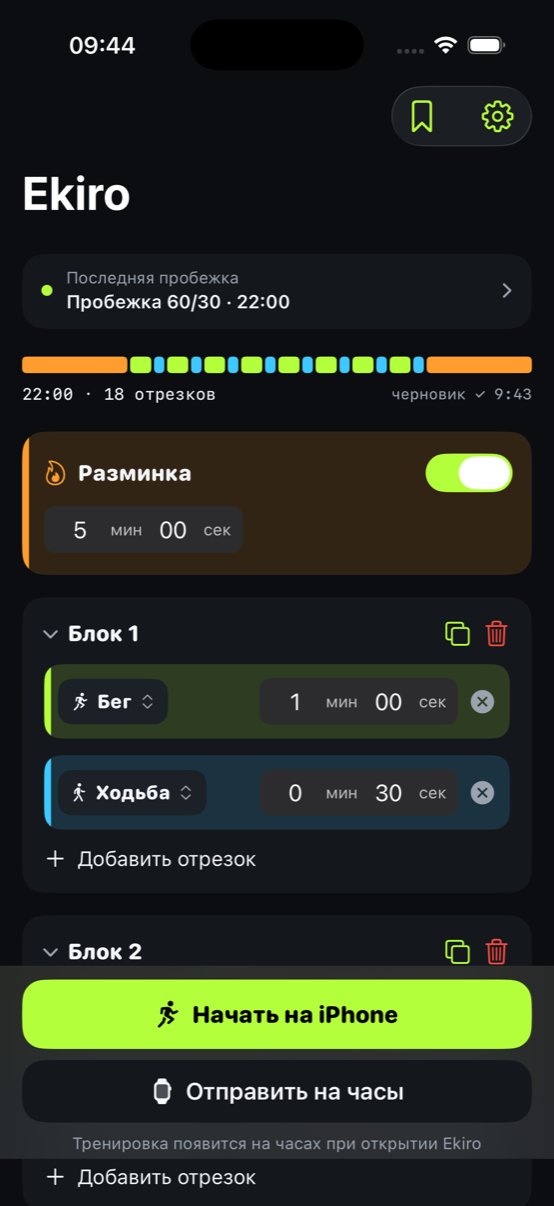
The main screen. The whole workout lives here — you can see all of it at a glance before you even start.
-
1
The track
The whole workout in one strip. Orange is warm-up and cool-down, green is running, blue is walking. You can see the rhythm before you start.
-
2
Warm-up and cool-down
Turn them on with a single switch and set them up separately from the blocks.
-
3
Block
A block is a set of segments. The icon next to it copies the whole thing, so you don't have to rebuild a repeat from scratch.
-
4
Any duration
Each segment has its own time: 20 seconds of running or six minutes. Ekiro doesn't impose anything.
-
5
Start on iPhone
Voice cues and vibrations guide each switch, so you can keep your phone in your pocket.
your own builds — with Core -
6
Send to the watch
Or send the workout to your Apple Watch and run with no phone at all.
You can always build your own workout. Starting workouts you’ve built yourself is unlocked by the one-time Core purchase; three ready-made workouts remain free.
The run: no need to look at the screen
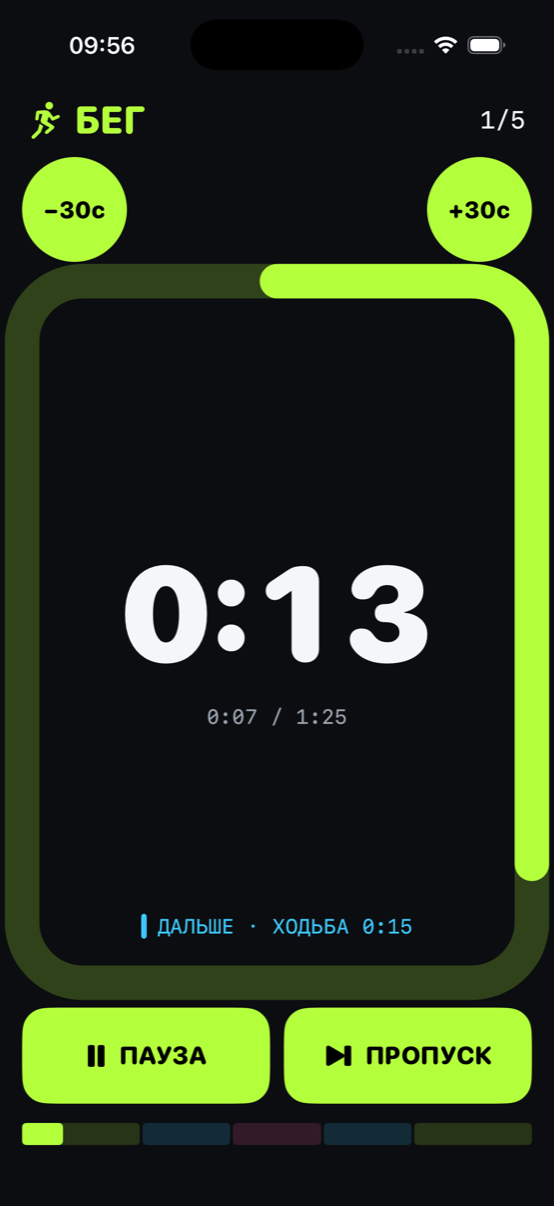
The screen during a workout. Designed so you don't have to peer at it while running — and if you do glance, everything is clear in half a second.
-
1
What you're doing now
Running, walking, or a sprint. The whole screen changes color with the phase — you can tell out of the corner of your eye.
-
2
Segment count
How many segments are behind you and how many are left until the end of the workout.
-
3
Time left
Big numbers counting down to the phase change. Ten seconds before the switch, a signal; at the switch, a voice.
-
4
±30 seconds
Too hard — or too easy? Adjust the current segment while you’re running. The rest of the plan stays intact.
-
5
What's next
The next phase and its length — so you know what to get ready for.
-
6
Pause
And while paused, there’s “+ one more block” in case you feel like adding another round at the end.
Everything on this screen is free.
Ekiro Coach: your workout grows with you
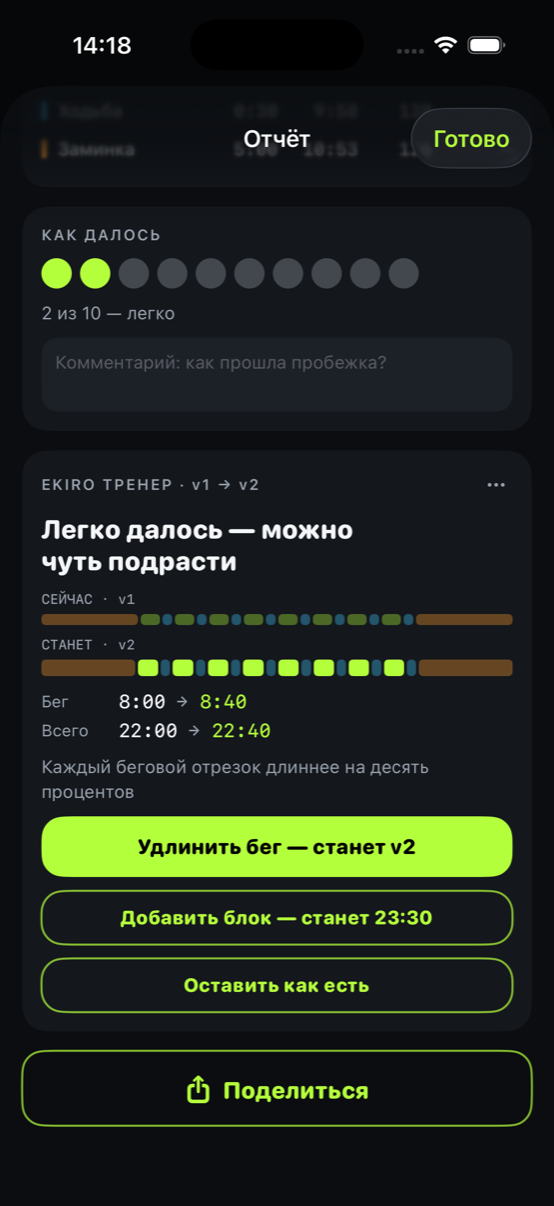
One of Ekiro’s most distinctive features. After a run, Coach asks just one thing — how hard it felt. Based on your answer, it suggests how to adjust your next workout.
-
1
How it felt
The only question after a run. A rating from 1 to 10 — by feel, no stopwatches or formulas.
-
2
Plan version
v1 → v2. Your workout has versions, like a document: you can always see which step you're on.
-
3
Before and after
Two tracks side by side: today’s on top, the suggested one below. The difference is clear at a glance.
-
4
Exact numbers
Run 8:00 → 8:40. No vague “we adjusted something”: the exact increase is right there.
-
5
Or add a block
Don’t want to run longer without stopping? Add another round with the same intervals.
-
6
Or keep it as is
You can always say no, and the app won't remind you about it every day.
Everything is unlocked for the first 14 days. After that, progression is guided by the Ekiro Coach subscription — 60 days come free with the Core purchase.
Report: what actually happened
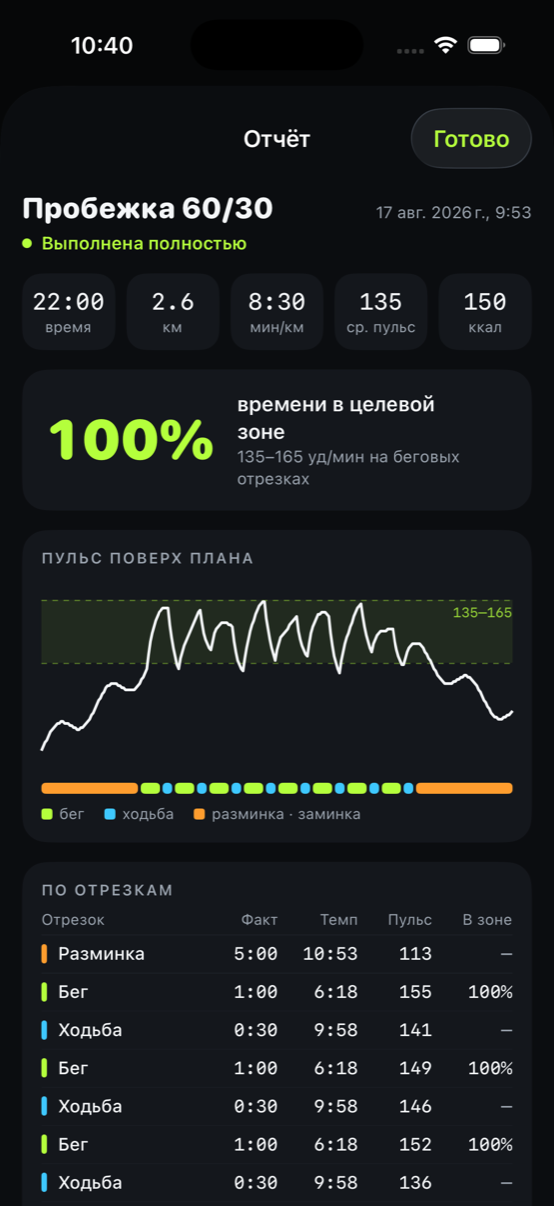
After you finish, you get a breakdown of the run — not for the numbers’ sake, but to understand how your body responded to the workload.
-
1
One-line summary
Time, distance, pace, average heart rate, and calories.
-
2
Time in range
How much time during the run your heart rate stayed within your limits. One number instead of studying a chart.
limits — with Core -
3
Heart rate over the plan
You can see how your heart responded to each segment: rising while you run, easing while you walk. The green band is your range.
-
4
The same track
Below the chart is the run plan — easy to tell which segment a spike belongs to.
-
5
Segment by segment
And line by line: actual time, pace, heart rate, and share of time in range for every segment.
Reports are free forever. Heart-rate limits are part of Core; without them, the chart shows your heart rate without the range.
Progress: you can see what's changing
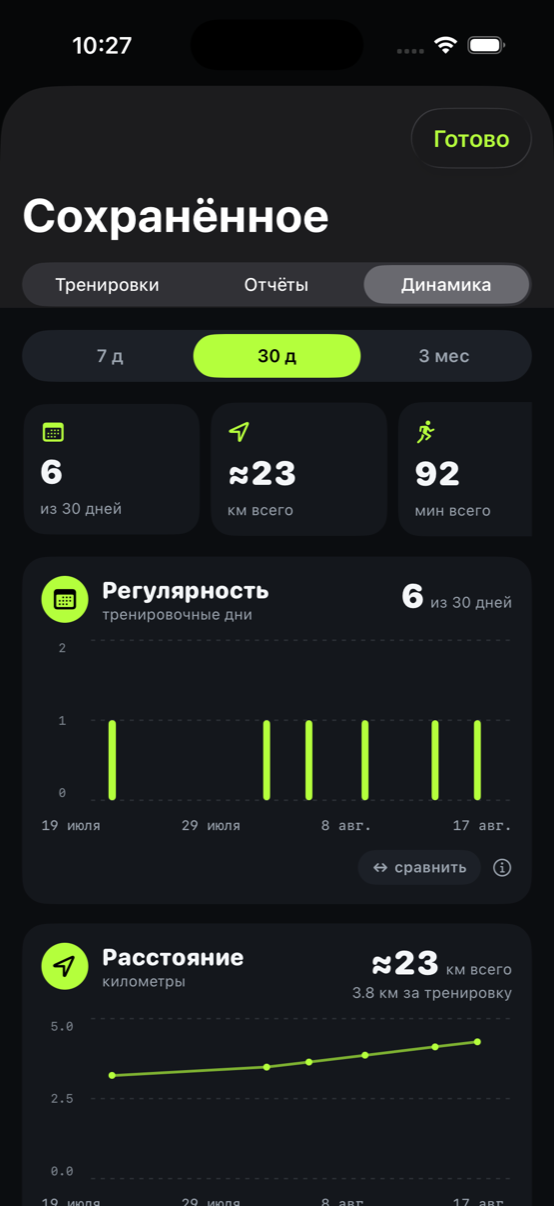
A separate screen for weeks and months. One run tells you nothing — two months tell you plenty.
-
1
Period
Seven days, thirty days, or three months. Three months are grouped by week, so the chart doesn't turn into noise.
-
2
Summary
How many days you ran, plus the total distance and time you accumulated.
-
3
Consistency
A bar for every training day. Rest days stay visible too — hiding them would make the picture look better than it really is.
-
4
Compare
Add a second metric to the same chart — running time and heart rate, for example. You can see right away whether the workload is growing without your heart rate rising with it.
-
5
A card per metric
Further down: distance, running and walking time, heart rate, easy running, and your ratings. Each has its own axis in its own units.
Progress is free forever. Your history keeps building no matter what, even if you never buy anything.
Settings: set once and forget
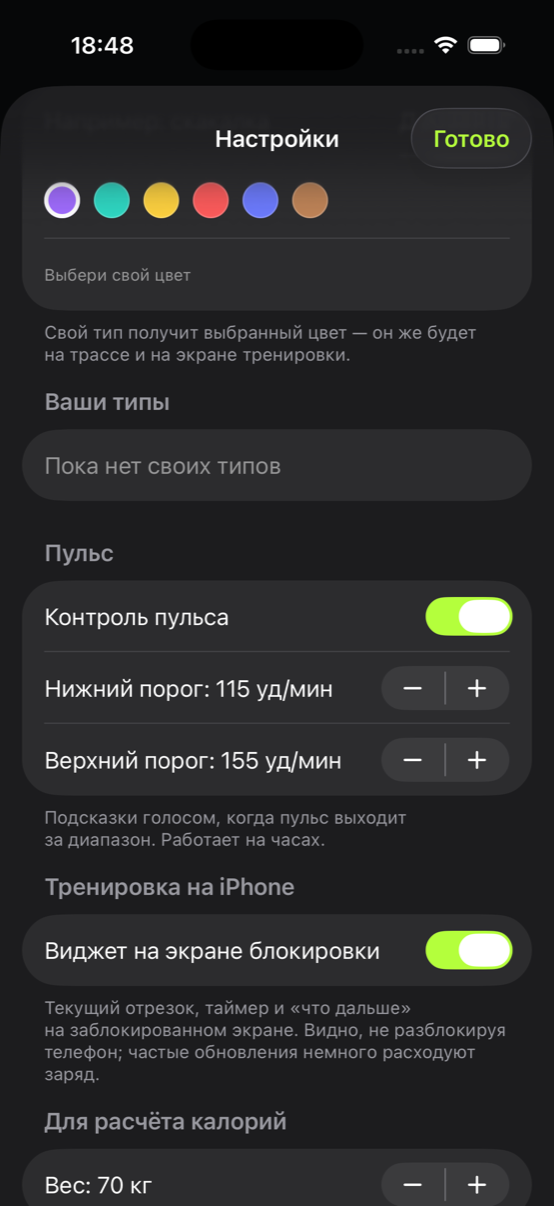
There aren't many settings, and every one earns its place: heart-rate limits, custom segment types, weight for calories, and a switch for suggestions.
-
1
Custom segment types
Beyond running and walking, add your own: jump rope, plank, a strength block. With its own color — the same one shows on the track.
with Core -
2
Heart-rate monitoring
Turn it on with a single switch. From then on, the watch handles the monitoring and gives you a voice alert if your heart rate leaves the limits.
with Core -
3
Your limits
Not “zone 3 by a formula”, but the numbers your doctor or coach gave you. You can change them before every run.
with Core -
4
Lock Screen widget
The current segment and timer are visible without unlocking your phone.
-
5
Weight for calories
Only used to estimate calories burned. It's never sent anywhere.
Heart-rate limits and custom types are unlocked by Core. Everything else always works.